5.4.1.1 Searching
SpamSieve supports searching in the Corpus, Log, Blocklist, and Allowlist windows. Using the search field in the toolbar, you can filter the top of the window to display to show only those items that match the search criteria. You can open this help page by selecting Search Syntax Reference from the search field menu.
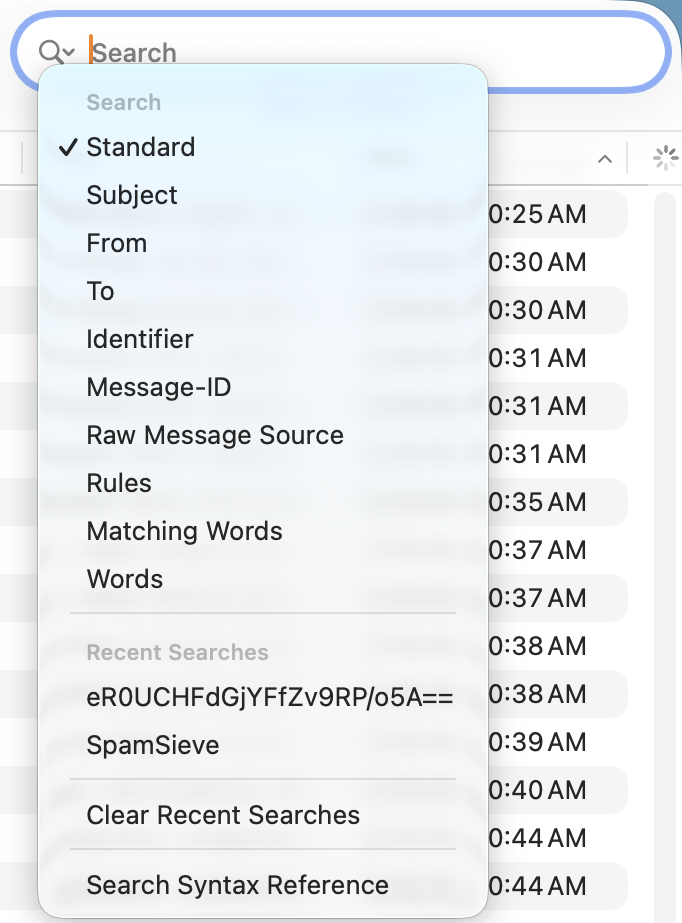
Additionally, you can choose Edit ‣ Find ‣ Find to search within the Info, Raw Source, and Structure tabs at the bottom of the window. The rest of this section concerns the search field at the top.
Search Scope
When searching messages in the corpus or log entries in the log, you can choose between a Standard search or one of the other search scopes:
- Standard
- This is normally what you want, as it will search almost everything in the message or log entry. However, in some circumstances you may want to choose a more specific scope, either to make the search faster or to narrow the results. Note that this does not search the Raw Message Source, the Words, or descriptive text in the Type or Subject column that’s not part of the message or an error.
- Subject
- Searches the subject of the message.
- From
- Searches the name and address of the message’s sender.
- To
- Searches the address where you received the message (which may be different from what’s shown in the message’s To: header).
- Identifier
- Searches for messages with the given SpamSieve identifier (which will look something like xiNVGwM5KM7sGk71w7KNZQ==). You can find a message’s identifier in the Info tab. The identifier is computed based on the headers of the message, and SpamSieve uses this to determine whether it’s seeing the same message again (e.g. so it can tell during training whether you’re correcting a mistake or teaching it a new message).
- Message-ID
- Searches the message’s Message-ID: header. This is the identifier generated by the message’s sender and may look something like <4824BBE7-3B56-4702-9F6C-13C45C8D7C7E@c-command.com>. Note that multiple messages with different SpamSieve identifiers may have the same Message-ID. For example, if you receive two copies of a message sent to different e-mail addresses, the Message-ID will be the same but the SpamSieve identifiers will be different because the messages took different paths (documented in the Received: header) to reach you.
- Raw Message Source
- Searches the message’s RFC 822 data, i.e. the full message data (headers, body, attachments) that your mail client downloaded from the server, as shown in the Raw Source tab. The data may be transfer encoded (Quoted-Printable or Base64) and include HTML and CSS.
- Rules
- Searches the Text to Match of any Blocklist or Allowlist rules that were created or edited or that matched a message.
- Matching Words
- Searches words that the Bayesian classifier used to predict whether a message was good or spam. These are also shown in the Info tab of a Predicted log entry. This includes regular words found in the message body as well as special words like S:Apple, R:^relay2^apple^com, and ^a-style-fontfamilyArialsansserifcolorwhite that SpamSieve uses to track more specific message characteristics. (For examples, see the Words tab of the Corpus window.)
- Words
- Searches the corpus words in the message. This is different from Matching Words in that it searches all the words in a message (or in a Predicted or Trained log entry) even if SpamSieve deemed them to be neutral (not a strong indicator of good vs. spam) and so they do not appear among the significant Words in the Predicted log entry.
Note that Raw Message Source and Words searches are slower than the other types and are only possible for messages where SpamSieve is storing the full message data. This includes all messages in the corpus that were trained using SpamSieve 3.0 or later. If you’re using the Prune full message data in log setting, only newer log entries will have their full data stored.
Search Query Syntax
Except where noted below, searches are case-insensitive and diacritic-insensitive. A multi-word query is treated as a phrase search. Searches support wildcards such as * (which matches any number of additional characters) and ? (which matches a single character). To search for a literal wildcard character, you can escape it, e.g. \? to search for a question mark.
When searching by Identifier or Message-ID, you must search for the entire identifier, not just a some of the letters. This is case-sensitive, and wildcards are not supported. Typically, you would know the exact identifier because you are copying and pasting it from elsewhere. If you need to search for a fragment of a Message-ID: header you can do that using Raw Message Source.
When searching by Raw Message Source, searches are case-sensitive and do not support wildcards. Non-ASCII search terms may not directly match the raw source because it may be encoded.
Search Examples
- A From search for @apple.com will find messages sent to you from Apple.
- If you have multiple mail accounts or aliases, a To search can help you find messages sent to a particular address.
- If you see a message in the Log and copy its Identifier from the Info tab, you can search for that identifier to find all the log entries pertaining to that message. For example, if a spam message went to your inbox, it may have been Predicted: Good and then Trained: Good (Auto), then you corrected the mistake so it was Trained: Spam (Manual). Or there may be multiple Predicted entries for the same message if you mail program kept seeing it as new and sent it to SpamSieve for analysis multiple times.
- Searching by Message-ID can be useful if you are trying to find a message that you see in your mail client or in a server log. In that case, you don’t know the SpamSieve identifier to uniquely identify the message, but this search will narrow the results down much more than searching by Subject or From.
- If you see that a message was classified as good or spam due to a particular rule, you can do a Rules search to see when and why that rule was created and which other messages were also classified using that rule. If a rule is not fully reliable, but you’ve locked it so that SpamSieve keeps it enabled, you can find all the messages classified using that rule—both correctly and incorrectly classified—to help evaluate whether you still want to use that rule.
- If you see that the Bayesian classifier predicted a message to be good or spam (in part) due to a particular word, a Matching Words search can find other messages where that word also played a role. This can also be useful (instead of a Words search, as below) in searching the log for messages that contain a particular corpus word. It will not find all messages with that word because it’s only searching messages where that word was one of the ones that SpamSieve deemed important to that classification. However, it may find some messages that a Word search doesn’t because, if you’re using the Prune full message data in log setting, older messages in the log won’t have their full message data stored, so it won’t be possible to search all their words.
- Words searches can be useful in checking the training when a message was not classified correctly. For example, if the Bayesian classifier incorrectly predicted a spam message to be good, the Words in the Info tab will show which key words SpamSieve used to make this determination. Suppose you see v1agra(0.005) there. This seems like a word that would only appear in spam messages, but the spam probability being very close to zero means that SpamSieve thinks it’s a strong indication that the message is good. Something isn’t right here. You could go to the Good Messages section of the Corpus window and do a Words search for v1agra to find which messages SpamSieve was trained with that made it think this word was good. If you find messages in the Good section that are spam (e.g. trained by mistake or auto-trained messages that you failed to correct) you could fix that by training them as spam. There’s more information about this in the Fixing Uncorrected Mistakes section of the manual.