5.4.5 Allowlist
The Allowlist command in the Window menu opens the Allowlist window. The allowlist consists of a list of rules. If a message matches one or more enabled rules on the allowlist (and Use SpamSieve allowlist is checked), SpamSieve will predict that it is good. The allowlist is most commonly used for matching messages sent from particular addresses, domains, or mailing lists.
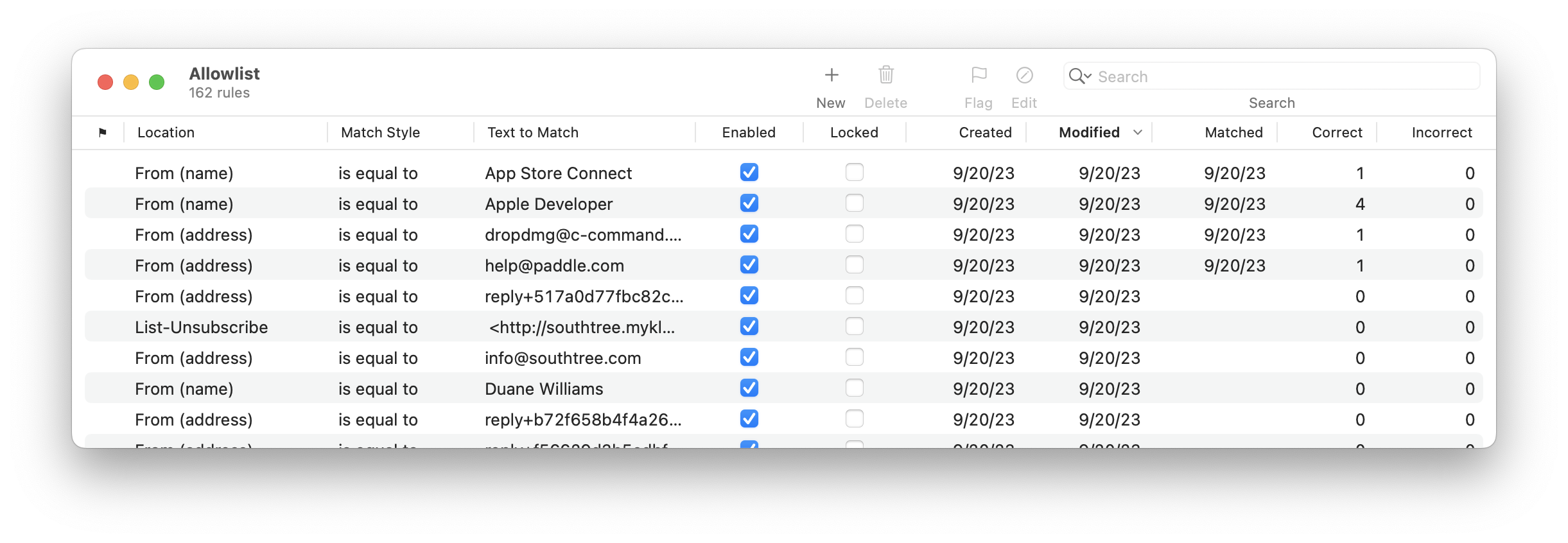
The counterpart to the allowlist is the blocklist.
For information about searching the allowlist, please see the Searching section.
Creating Rules
There is normally no need for you to manually create or delete allowlist rules because SpamSieve learns to recognize your good automatically. If a lot of good messages are in your Spam mailbox, your first steps should be to check the setup in your mail program and to check the log rather that to create allowlist rules.
Rules and Training
By default, the Train SpamSieve allowlist preference is enabled. This means that SpamSieve will automatically create allowlist rules when you train a message as good. Once you receive one good message from a person, all future messages will get through to your inbox.
SpamSieve will also disable matching allowlist rules when you train a message as spam. This prevents a bad allowlist rule from letting through similar spam messages.
By default, the Auto-train as needed preference is enabled. This means that if you receive a message that SpamSieve thinks is good, SpamSieve will automatically add allowlist rules so that future messages from that same sender are also classified as good. Thus, it is important to correct all the mistakes to avoid having incorrect allowlist rules.
Editing Rules
You can edit a rule’s Header or Match Style by clicking in the corresponding column and choosing from the pop-up menu. To edit a rule’s Text to Match, double-click the text. For more information about the available options see the Rule Columns, Locations, and Match Styles section.
Deleting and Disabling Rules
You can delete a rule from the allowlist by selecting it and pressing Delete. Generally, there is little reason to delete rules. SpamSieve is optimized such that having lots of rules does not reduce performance.
Spammy Allowlist Rules
It is normal to see spammy rules on the allowlist that are unchecked. This is because of auto-training. When SpamSieve thinks an incoming message is good, SpamSieve also adds a rule to the allowlist. SpamSieve may be wrong about that message, and that’s OK. If SpamSieve makes a mistake and lets a spam message through, when you train the message as spam it will disable the corresponding allowlist rules. The rules will then be shown as unchecked. A disabled rule won’t match any messages, so it won’t cause any spam to get through.
If you see spammy rules that are checked, this is not normal. It means that you have not been correcting all the mistakes.
Do not delete spammy allowlist rules. This is almost never a good idea:
- If the rules are disabled, you should leave them in place to prevent SpamSieve from creating those incorrect rules again in the future.
- If the rules are enabled, you should find the spam messages from those addresses and train them as spam. Not only will this disable the rules, but it will also update SpamSieve’s corpus and statistics.
Allowlisting Domains
You can tell SpamSieve to classify every message from a particular domain as good. For example, to allowlist every message from Apple, open the Allowlist window, click the + button, and create a rule that says From (address) Ends With @apple.com.
Mailing List Messages
The allowlist has special support for mailing lists. If you train SpamSieve with a good message from a mailing list, it will add a rule to the allowlist that matches the message’s mailing list header (List-ID, List-Unsubscribe, or Mailing-List). Then SpamSieve will know that all messages from that mailing list are good, regardless of who sent them.
Codewords
You can use the allowlist to create codewords. For instance, you could create a rule in the allowlist that matches subjects containing “eggplant” (or some other word unlikely to occur in regular mail). You can tell select people to put “eggplant” in the subject of messages that they send you, and then you can be assured that their messages will get through, even if the sender addresses are not in your address book or allowlist.
Finding Rules
You can type the first few letters of a rule’s Text to Match to quickly locate that rule, or use the search field in the toolbar to focus on a group of related rules.
Exporting Addresses
You can use the Copy Allowlist/Blocklist Addresses script to get a list of addresses, e.g. to add to the configuration of a server-side spam filter.
You can also select rules in the Allowlist window and choose Copy to copy them to the clipboard in a tab-separated format that can be processed with Excel or Numbers.
Troubleshooting Rules
Allowlist rules will not match a message if: