8.3 Setting Up Entourage v.X
Go to Entourage’s Tools menu and choose Junk Mail Filter. Turn off Entourage’s junk filter unchecking Enable Junk Mail Filter.
Double-click the SpamSieve application and choose Preferences from the SpamSieve menu. Make sure that Use Entourage/Outlook address book is checked, and click the Load button. Then click on the SpamSieve icon in the Dock and click Edit Addresses in SpamSieve’s Filters settings.
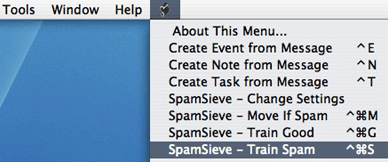
Choose Install Entourage Scripts from the SpamSieve menu. Quit and re-launch Entourage; then you should see four SpamSieve items in Entourage’s Scripts menu:
Now, set up a mail rule in Entourage that looks like this:
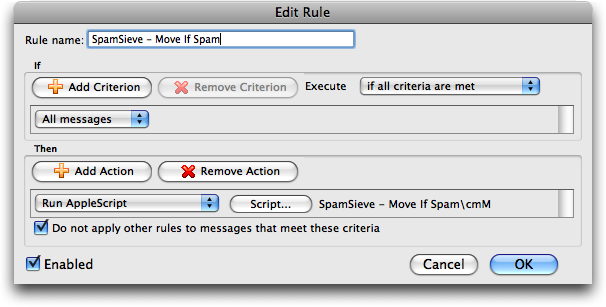
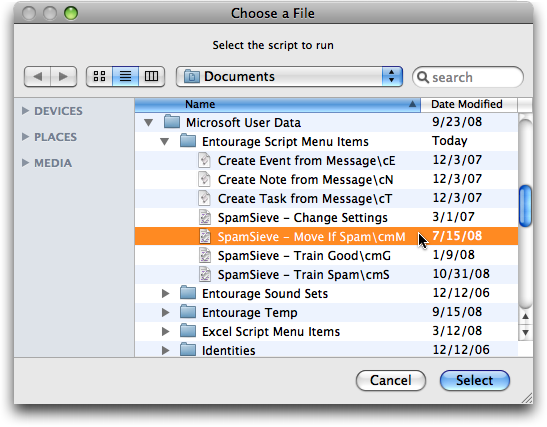
To do this, choose Rules from Entourage’s Tools menu. Click on the tab corresponding to the type of account you have (e.g. POP). If you have more than one kind of account, you will need to create an identical rule for each account type. Click the New button. Change the name of the rule to SpamSieve - Move If Spam. Then click just to the left of Change status to choose the first action. Click Remove Action to delete the Change status action. Click on the menu that says Set category and choose Run AppleScript. Then click the Script… button and Select the SpamSieve - Move If Spam\cmM file. This file is stored in the Entourage Script Menu Items folder (which is probably inside the Microsoft User Data folder inside your Documents folder):
Note: It is important that you create the rule exactly as shown. Do not add additional actions below the action that runs the AppleScript. Such actions would apply to all messages (not just spam ones), which is probably not what you want.
Click OK and drag the SpamSieve rule to the top of the list.
Now proceed to the Do an Initial Training section. To train SpamSieve with spam messages, select one or more of them and then choose SpamSieve - Train Spam from Entourage’s Scripts menu. To train SpamSieve with good messages, select one or more of them and then choose SpamSieve - Train Good from Entourage’s Scripts menu. The keyboard shortcuts for these commands are Command-Control-S and Command-Control-G.
SpamSieve will process new mail automatically. If you ever need to manually ask it to sift through a mix of spam and good messages, select the messages and choose Apply Rule ‣ All Rules from the Message menu.
The above is all you need to know about using SpamSieve with Entourage. The Entourage Customization section explains some more advanced setup options.
- IMAP Accounts
Entourage v.X does not support moving IMAP (or Hotmail or Exchange) messages via AppleScript. Thus, if you have one of these types of accounts, the spam messages will not be moved to your Junk E-mail folder. The best solution is to update to Entourage 2004 or 2008, which do not have this limitation. If you do not wish to do this, here are some possible workarounds:
- If you do not require IMAP, you can try creating a POP account in Entourage and re-entering your account information. Many IMAP accounts also work via POP, and this will allow SpamSieve to move the messages that it thinks are spam.
- Create an Entourage rule that moves messages that SpamSieve has marked as junk into another folder. After receiving mail, manually apply this rule to the messages in your IMAP account.
- Make a mail view of your IMAP account that looks for messages that are not junk. In this way, you can view your good messages without being distracted by the spam ones.
- Rule Tips
Once an Entourage v.X rule runs an AppleScript or moves a message, it cannot apply any more rules to that message. This limitation means that extra steps are necessary to integrate SpamSieve into a complex set of Entourage rules. The easiest solution is to update to Entourage 2004 or 2008, which are more flexible about how they handle AppleScript rules. If you do not wish to do this, here are some possible workarounds:
One option is to order your rules so that Entourage applies the SpamSieve rule after all your other rules. You can change the order of the rules by choosing Rules from Entourage’s Tools menu and dragging the rules in the list to change their order. With this approach, you can filter your good messages into folders however you want. Any mail that is not moved into another folder will remain in your inbox. Then, the SpamSieve rule will either mark the spams as junk or move them to a Junk E-mail folder. The disadvantage to this approach is that SpamSieve cannot catch any spams among the messages that were moved by your other rules.
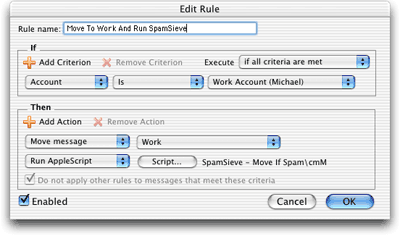
Another option is to add the Run AppleScript action to each rule that moves messages. For instance, suppose you have a rule that moves all the messages from your Work Account account into a Work folder. You could set up the rule as shown below.
Now, messages sent to that account will be moved to the Work folder. Spam messages sent to that account will be moved to the Junk E-mail folder. You can add the SpamSieve AppleScript action to every rule that moves messages and also to a “catch-all” rule that applies to messages that aren’t moved. Then SpamSieve will be able to filter all the messages that you receive.