5.8.1 Show Info
This window lets you view and edit the properties of the selected records. You can type Tab to move between to text fields, or Control-Tab to move out of the notes text view. The Info inspector can be opened via Command-I or Command-Option-I.
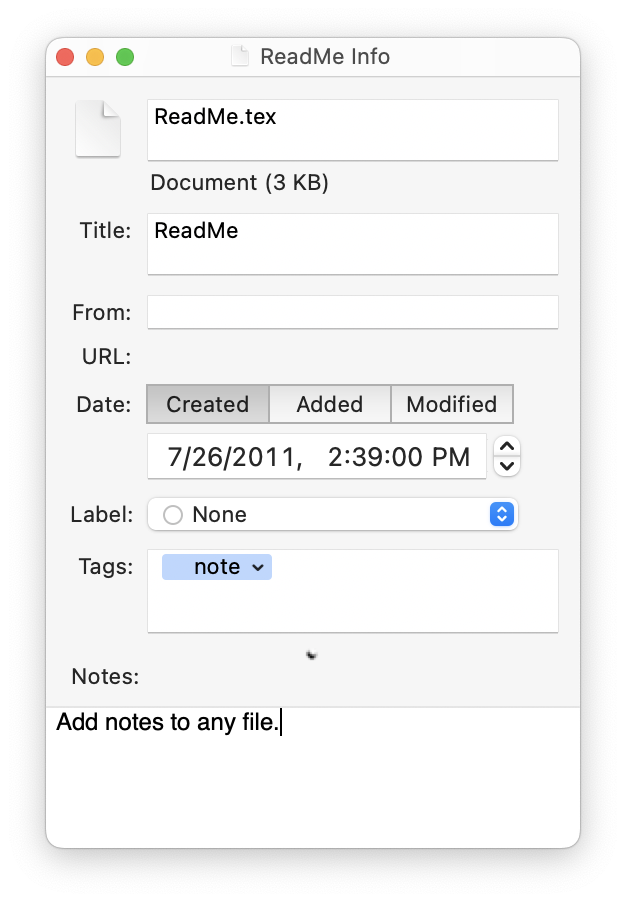
- File Properties
This shows the file’s name, kind, size, and dates, as well as EagleFiler metadata such as the title, source URL, and from. These are described in the Records List section of the manual.
If the file didn’t have an embedded title (or you set the title to be blank), EagleFiler will use the filename (without the extension) as the title, and the title will stay in sync with the filename if you rename it.
- Label
- This is the Finder label of the file. For more information, see the Set Label section.
- Tags
- This shows the tags assigned to the record. You may find it more convenient to create and assign tags by typing them in the text field than by using the Show Tags command. For more information about tags, see the Add Tags and Notes section of the manual.
- Notes
- This shows the notes that are associated with the record. Most of the commands for editing notes are in the Format menu. You can use the Copy Record Link to copy a link to an EagleFiler record; then paste the link into another record’s note so that you can easily find one record while viewing the other. As a shortcut, you can type Option-Tab to start a bulleted list or Option-Shift-Tab to dedent the current list item. For more information about notes, see the Add Tags and Notes section of the manual.
To make changes to more than one record at once, you can use the Batch Change… command.